🚀 Getting Started with Royalti.io
🚀 Getting Started with Royalti.io
Welcome to Royalti.io, your comprehensive solution for efficiently managing music royalties, catalogues, and contracts. This guide will walk you through setting up your account and familiarizing yourself with the basic functionalities of our platform.
To get started with Royalti.io, follow these simple steps:
Sign Up
The first step is to create an account on Royalti.io. Click here and follow the instructions to create an account and Workspace.
Import Data
After your account and workspace has been set:
-
Log into your account
-
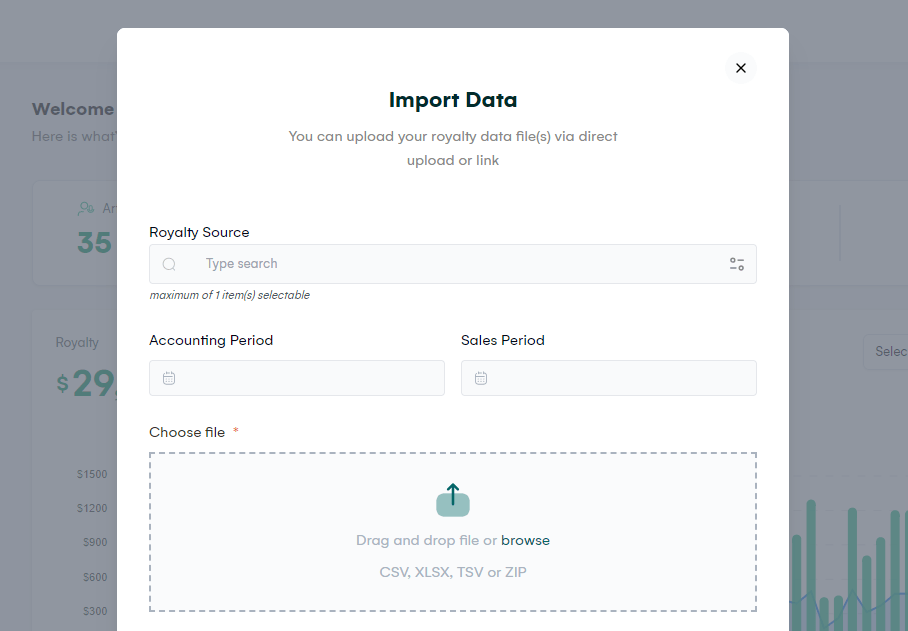
Click the button Import Data
-
Fill out the Upload data form and submit
-
Wait 10 - 60 seconds, refresh the dashboard page
For further instructions, click here...
Import Your Catalog
Using the bulk import tool, you can import your catalog items: Assets and Products.
-
Go to the Catalog > Assets page
-
Click Upload button
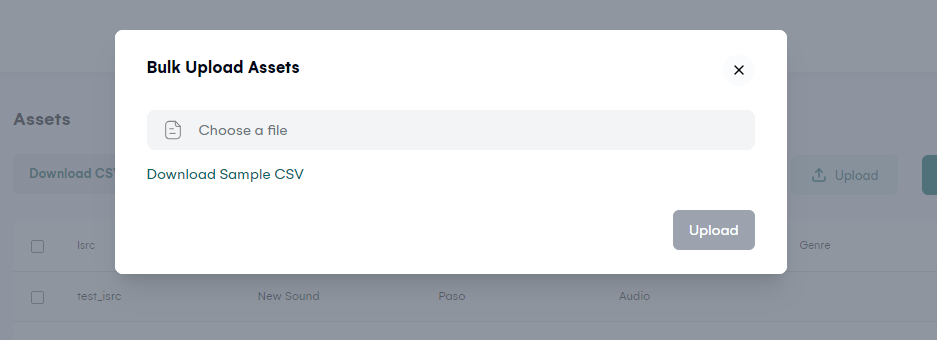
Attach a pre-filled CSV file and click Upload.
Click Download Sample CSV to get the template to fill.
Extract Catalog from Royalty Data
If you have previously imported some Royalty data, the platform can detect Assets and products in the data that are not yet present in the workspace.
To download a list of Catalog items from your Royalty data:
-
Select Checklist from the menu
-
Under each card for missing Assets and Products, click the CSV button to download CSV file
-
Edit the file to add missing information
-
Use the Bulk Import tool from the Assets page
Invite Users
You can create new User profiles and invite an email to gain access to the workspace
Go to Roster > Users
Set Up Splits
Splits can be created manually or automatically set from the Checklist page.
Getting Help & Support
We're here to help you every step of the way. Feel free to email us at hello@royalti.io or start a conversation by clicking the chat icon in the bottom right corner.
##
Related articles
Managing Payment Items in Royalti.io
This guide explains how to view, edit, and delete payment of the Accounting Management system. Getting Started To manage individual accounting items: 1. Log in to your Royalti.io account 2. Select...
Managing Royalty Sources
Overview The Royalty Sources feature allows you to manage and download royalty data from various platforms. This guide walks you through accessing, managing, and modifying your royalty sources....
Activating and Managing the Releases Feature - The Admin
What is the Releases Feature? The Releases feature is a comprehensive music submission and approval workflow system that allows your users to submit music releases for review and automatic catalog...
Still stuck?
Support answers within one business day — usually much faster.