Ask Roy: Your Royalty Data, One Question Away
Ask Roy is an AI assistant inside your Royalti dashboard. Query revenue, run catalog audits, manage splits, and upload files — in plain English.

You know that number your distributor owes you from Q4? It's buried somewhere between three CSV exports, two dashboards, and a formula you wrote six months ago. Finding it takes 20 minutes. Verifying it takes longer.
The reality of managing music royalties today is that the data exists, but getting answers from that data is painfully manual.
But that is where ‘Ask Roy’ comes in, the music royalty AI assistant built into your Royalti dashboard. Now you can turn those 20-minute searches into a single question.
What Is Ask Roy?
Roy is an AI assistant that reads and writes across your entire Royalti workspace, whether it’s revenue, catalog, splits, files, or releases, using 126 purpose-built tools. You type a question in plain English, and Roy returns the answer from your actual data.
You can find Roy from the sidebar, the floating button in the bottom corner, or just using a keyboard shortcut (Cmd+. on Mac, Ctrl+. on Windows and Linux).
Roy understands your catalog structure, your revenue periods, your split agreements, and even the way distributor reports actually work. Every tool it uses was designed for the intricacies of music royalty workflows.
See Ask Roy's full capabilities on the feature page.
Query Revenue, Catalog, and Splits
Royalty data queries that used to require exports and formulas now take one sentence:
"What was my total revenue from Spotify last quarter?"
Roy filters by distributor and date range, then returns a sortable table with monthly breakdowns. If you want a chart instead, ‘Ask Roy' renders bar charts, line charts, pie charts, and area charts directly in the conversation.
"Which tracks earned the most in the last 90 days?"
Roy ranks your assets by revenue. You'll see track name, total earnings, stream count, and top-performing platforms. Sort by any column or narrow it down: "Just show me tracks from the album 'Midnight Sessions'."
"Show me revenue by country for this year."
Roy breaks down earnings by territory as a table or chart. This is the same data you'd get from manually exporting and pivoting a distributor report. Roy does it in seconds.
Tables are sortable. Charts are labeled. Detail cards expand when you need more context.
More Than Answers — Roy Acts
Where most tools stop at just showing you information, Roy takes action across your workspace, but with your confirmation every step of the way. For example, when you ask Roy to:
"Create a 50/50 split between Artist A and Artist B for the album 'First Light'."
Roy finds the album, identifies all tracks, and sets up the split structure. And right before applying anything, it shows you exactly what it is about to do and asks for confirmation. You review, approve, and the splits are live.
Or to:
"Upload my latest DistroKid report."
Roy accepts CSV, TSV, XLSX, XLS, TXT, and ZIP files up to 500MB. All you have to do is drag a royalty file directly into the conversation; it processes the file and imports your data without navigating to a separate upload screen.
Roy is an operational tool;, however, you are always in control because every write operation goes through a confirmation step.;
Run Catalog Audits in One Sentence
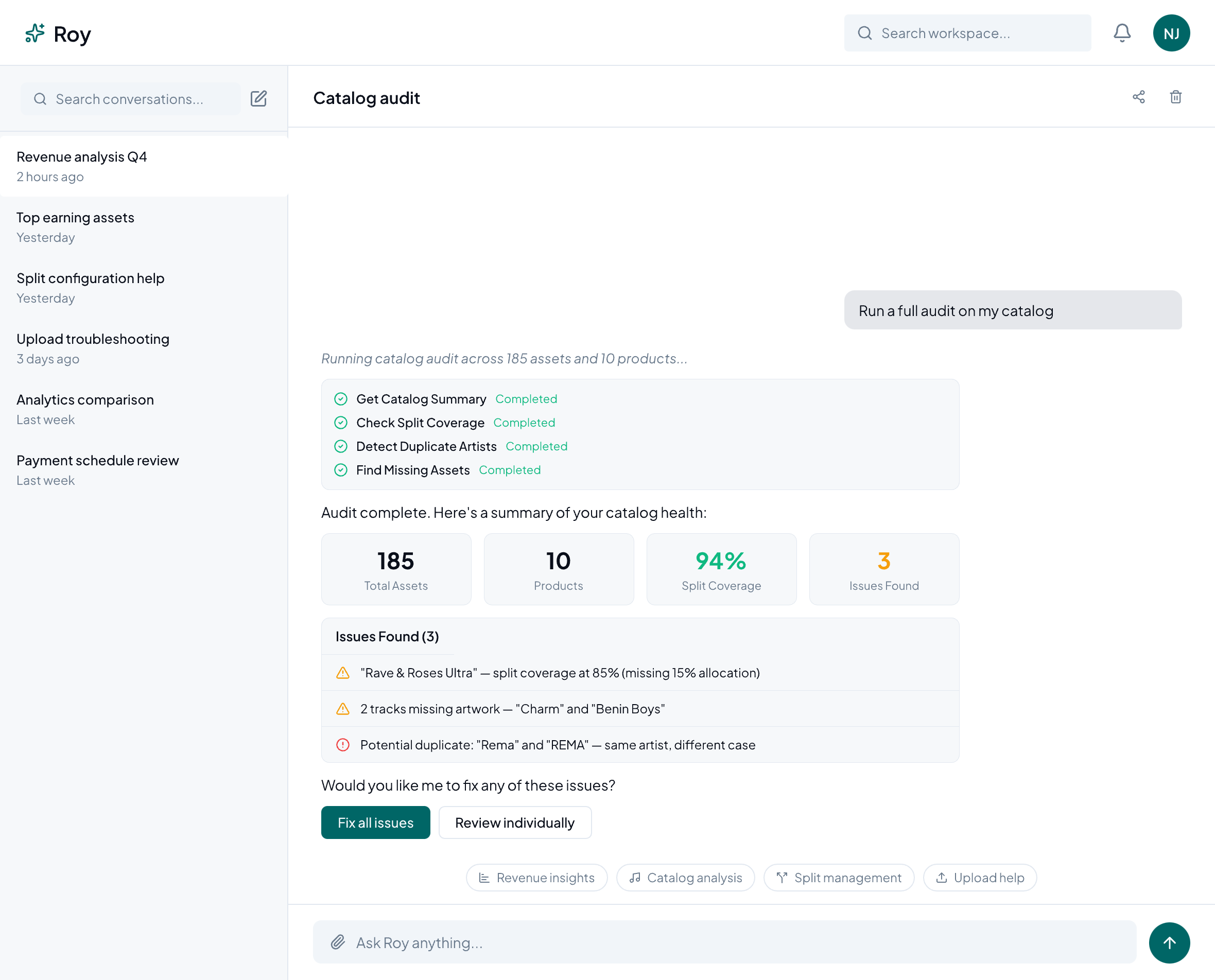
Roy's catalog audit tool includes 16 built-in checks that scan your workspace for problems you might not know you have. When you ask Roy to "Run a split coverage audit", it scans your entire catalog and flags every track or product missing split assignments. Results come back as a checklist you can work through, with each item linking to the relevant asset.
Roy can audit for:
- Missing assets: tracks in revenue data that aren't in your catalog
- Split coverage gaps: products or tracks without split assignments
- Duplicate artists: similar names that might be the same person
- Products without tracks: albums or singles with no recordings
- Revenue reconciliation: discrepancies between expected and actual payments
- Anomaly detection: unusual spikes or drops that warrant investigation
Beyond audits, Roy runs enrichment workflows, suggesting metadata corrections, filling in missing ISRC codes, and standardizing artist names. Each suggestion goes through a review-and-approve step. Nothing changes until you say so.
These guided workflows show live progress, present choice prompts when decisions are needed, and support multi-select for batch operations. It's structured enough to be reliable, but flexible enough to adapt to how you actually work.
Drop a File, Skip the Mapping
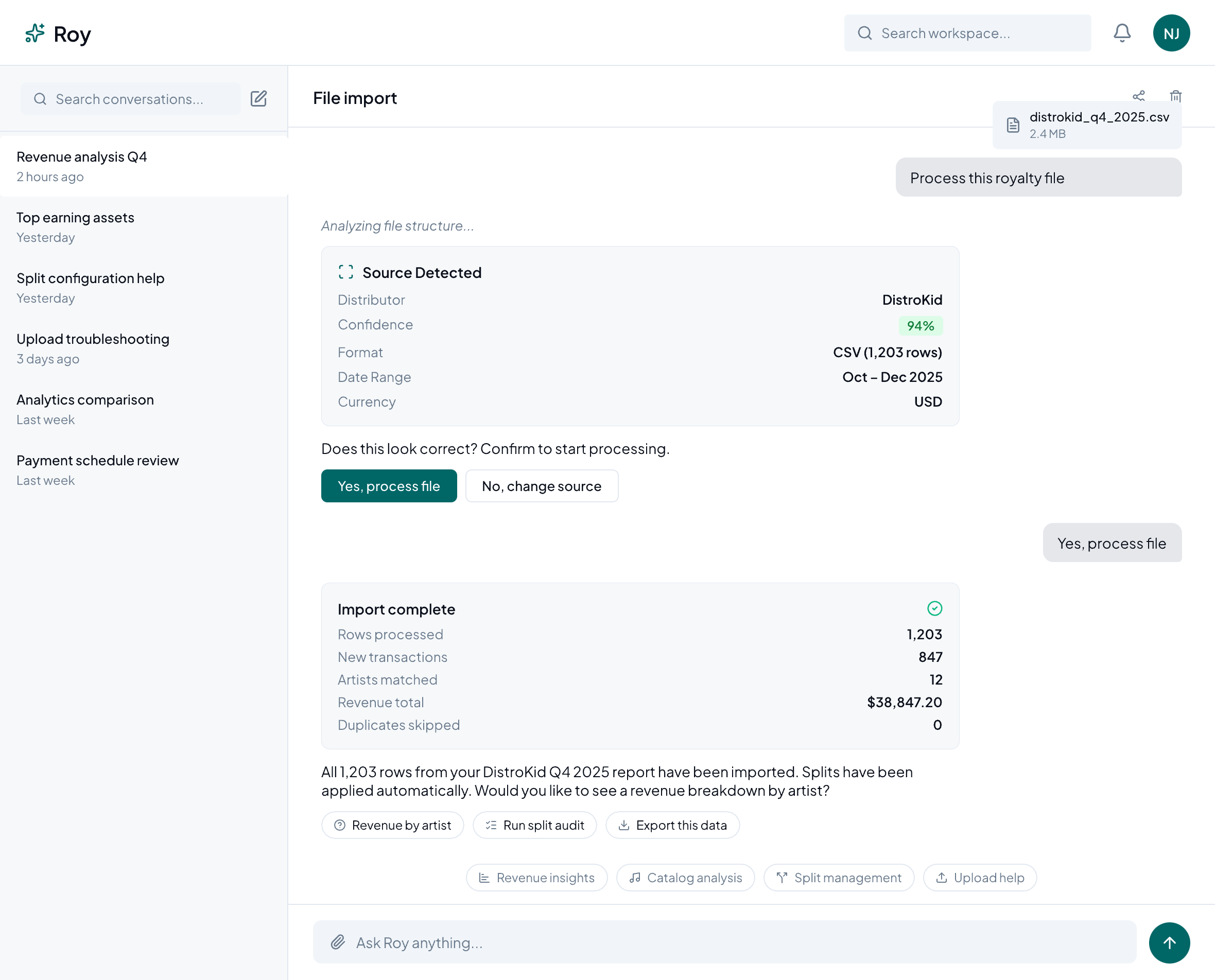
Every distributor formats royalty reports differently. Column names change, date formats vary, and some distributors rearrange their layouts between quarters. On any given day, you would spend time mapping each file to your system. But Roy handles the distributor file import automatically.
All you have to do is drag a royalty file into the conversation, and Roy will identify which distributor it came from and how the columns map to your workspace. All you have to do is confirm each detection while Roy processes the import.
There is no manual column mapping and no template configuration. If Roy encounters a format it hasn't seen before, it flags the uncertainty and asks you to verify before proceeding.
Frequently Asked Questions
How accurate is Roy?
Roy queries your actual workspace data, and the results are grounded in your real royalty records, not generated from templates or training data.
Is my data safe?
Your data stays in your workspace. Roy never trains on your information. All queries run within your existing Royalti permissions.
What file formats does Roy support?
CSV, TSV, XLSX, XLS, TXT, and ZIP files up to 500MB. Drop them into the chat or use the attachment button.
What if Roy can't answer my question?
Roy will tell you if it can't find the data you're looking for. Try rephrasing your question or check that the relevant data has been imported into your workspace.
Try It Now
'Ask Roy' is available today inside your Royalti dashboard. Open it from the sidebar, click the floating button, or press Cmd+. (Mac) or Ctrl+. (Windows/Linux).
Not on Royalti yet? Start your free trial and ask Roy your first question. Your data stays in your workspace and is never used to train models.
Already have an account? Log in and start asking Roy.
Ask Roy is available on all Royalti plans. Feature availability may vary by plan — see pricing for details.
About the author
Keep reading
All posts →
Royalti.io: How We Rebuilt DDEX Delivery
A release can fail on its way to stores without anyone noticing. Here is what broke in our DDEX delivery, how we fixed it, and what you can check first.
AI and Creator Consent 2: Before You Opt In to an AI Music Deal
Your distributor or publisher may already have the right to license your music for AI use. Here is what to ask and what to check for before you say yes.
AI and Creator Consent 1: What Creator Groups Want From AI Music Deals
Learn why creator groups are demanding consent, fair compensation and transparency from AI music deals
Comments
No comments yet. Be the first to comment!