Royalti.io: Three Features That Keep Your Catalog in Order
Delivery checks that stop bad releases, team access you can trust, and splits that change on schedule. Here is how each one works in Royalti.io
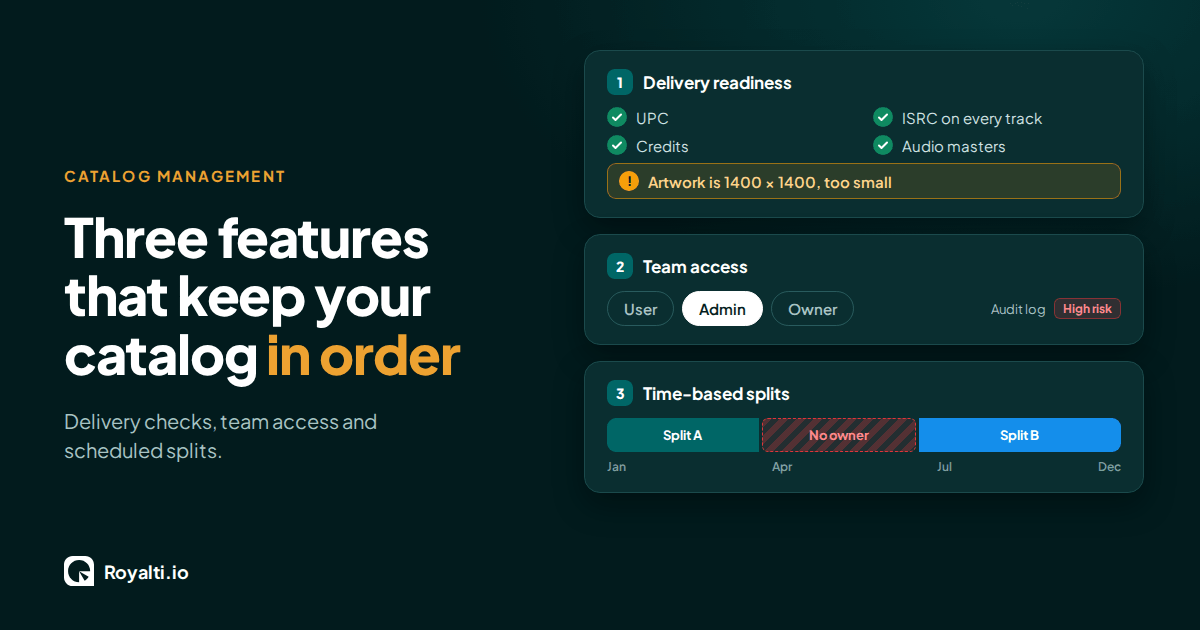
As a music catalog grows, it becomes harder to manage. More releases go out, more ownership deals start and end, and more people get access to the workspace. Royalti.io has anticipated that growth, providing three features to support seamless management at that stage: the delivery readiness checklist, team roles with an audit trail, and time-based splits. So let’s explore what each one can do.
Delivery Readiness Checklist
Aim: to find the problem before the store does.
Release failures are often discovered at the most inconvenient point when the store rejects it. The delivery tab now runs a checklist that catches failures before a release reaches the store. It checks the UPC, the ISRC on every track, label information, track language, artwork size, audio masters, and credits. And when it finds something wrong, it tells you exactly what it is. A cover that is too small, for instance, is flagged with its actual dimensions so you know precisely what to fix.
Worth noting that not everything on the checklist has the potential to block a delivery. For some items, the system flags advice rather than a hard stop: a missing split will be flagged as advice, meaning that the checklist will inform you, but you can still send the release.
When several deliveries for a release have failed, a Retry all failed action re-queues them in one go. The system then reports in detail: how many were requeued, how many were skipped, and how many could not be queued. This feature requires the DDEX & Deliveries add-on.
Team Access
Aim: a workspace trail for multiple roles
When more than one person works in a workspace, two primary questions arise: what can each person do and who is doing what? Someone has to keep track not just of access but of responsibilities. That is where this feature comes in. It assigns each user one of three roles: User, Admin, or Owner, and the assigned role determines what that user can see and do.
Roles are set by Admins from the permissions tab on a user’s page. The page describes what each role can do before anything is saved. The role is the only setting, keeping access easy to read and to review. There are no lists of individual permission switches to toggle on or off.
Admins can use the View as user to see a workspace exactly as a specific team member sees it; this feature is particularly useful for troubleshooting.
A few guardrails apply:
The feature is available to admins and owners only.
The person being viewed must belong to a workspace the admin administers.
Sessions last 30 minutes.
You cannot view as another admin or as yourself.
The function is not read-only, meaning that any changes made during a session are saved. Treat it as a way to look first and make changes from your own session when you can.
Everything is recorded in an audit log. Starting a session, ending it, and even a refused attempt are all logged. Royalti.io records creates, updates, deletes, exports, and imports, with a before-and-after record of each change. Each event carries a risk level, and deletes are flagged as high risk. View as user does not count as that user's activity, so their last login and activity feed stay accurate. Therefore, actions taken while viewing as another user are tagged to the admin who took them.
Admins can open the Audit Log from the navigation to filter by action, user, date range, and high-risk events. Each user's page also has an Activity tab, making it easy to confirm who changed a split or check an unexpected export.
Time-based splits
Aim: eliminating the need for manual edits by scheduling ahead.
In music, ownership changes more often than not. A distribution deal ends on a specific date. A producer's share steps down after recoupment. Those changes have to be edited by someone at the right time, because a late edit means that royalties get sent to the wrong person. Time-based splits let you build that schedule directly into the split itself, so the change happens automatically rather than depending on someone to remember to make a manual edit.
Each split has an optional start date and an optional end date. The start date is inclusive, and the end date is exclusive. A split that runs from January 1 to April 1 covers January 1 through March 31, and the next split can start on April 1 with no overlap.
The form labels each split so you can check its status at a glance:
Permanent: a split with no dates and carries the lowest priority.
Open-ended: a split with a start date only.
Fixed period: a split with both a start and an end date.
Until date: a split with an end date only.
A dated split takes priority over a permanent one for the period it covers, and on every split, shares must total exactly 100% or the form will not save.
The feature also includes a coverage check that shows a timeline of all dated splits for an asset, flagging any gaps or overlaps. A gap means royalties earned in that window have no owner. An overlap means it is unclear which split applies. Both need to be resolved before running a statement, since statements use whichever split was active during the reporting period. If a gap is found, it can be filled directly from the coverage view: a pre-filled succession dialog with a suggested name, the same shares as the split before it, and a start date that lines up with where the previous split ended.
Take a Pick and Start
If you are about to deliver a release, open its Delivery tab and read the checklist. If you are adding a teammate, check their role and know that the audit log is there. If a deal has an end date, schedule the split now and run the coverage check. Each one takes just a few minutes, and each saves you a harder conversation later.
About the author
Keep reading
All posts →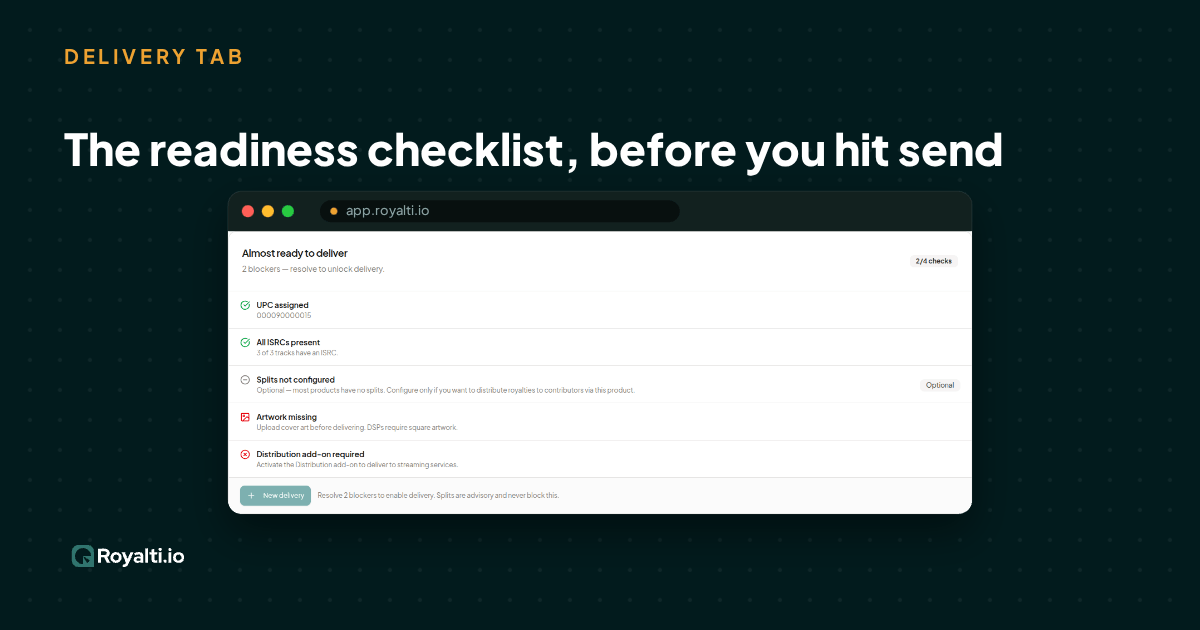
Royalti.io: How We Rebuilt DDEX Delivery
A release can fail on its way to stores without anyone noticing. Here is what broke in our DDEX delivery, how we fixed it, and what you can check first.
AI and Creator Consent 2: Before You Opt In to an AI Music Deal
Your distributor or publisher may already have the right to license your music for AI use. Here is what to ask and what to check for before you say yes.
AI and Creator Consent 1: What Creator Groups Want From AI Music Deals
Learn why creator groups are demanding consent, fair compensation and transparency from AI music deals
Comments
No comments yet. Be the first to comment!