Ask Roy: Your AI Assistant
Roy is the AI assistant built into Royalti. You can ask it questions in plain English about your catalog, royalties, payments, and files, and it answers using your workspace's real data. This guide covers how to open and use Roy, what it can do, and how admins configure access, credits, and its knowledge base.
Where to Find Roy
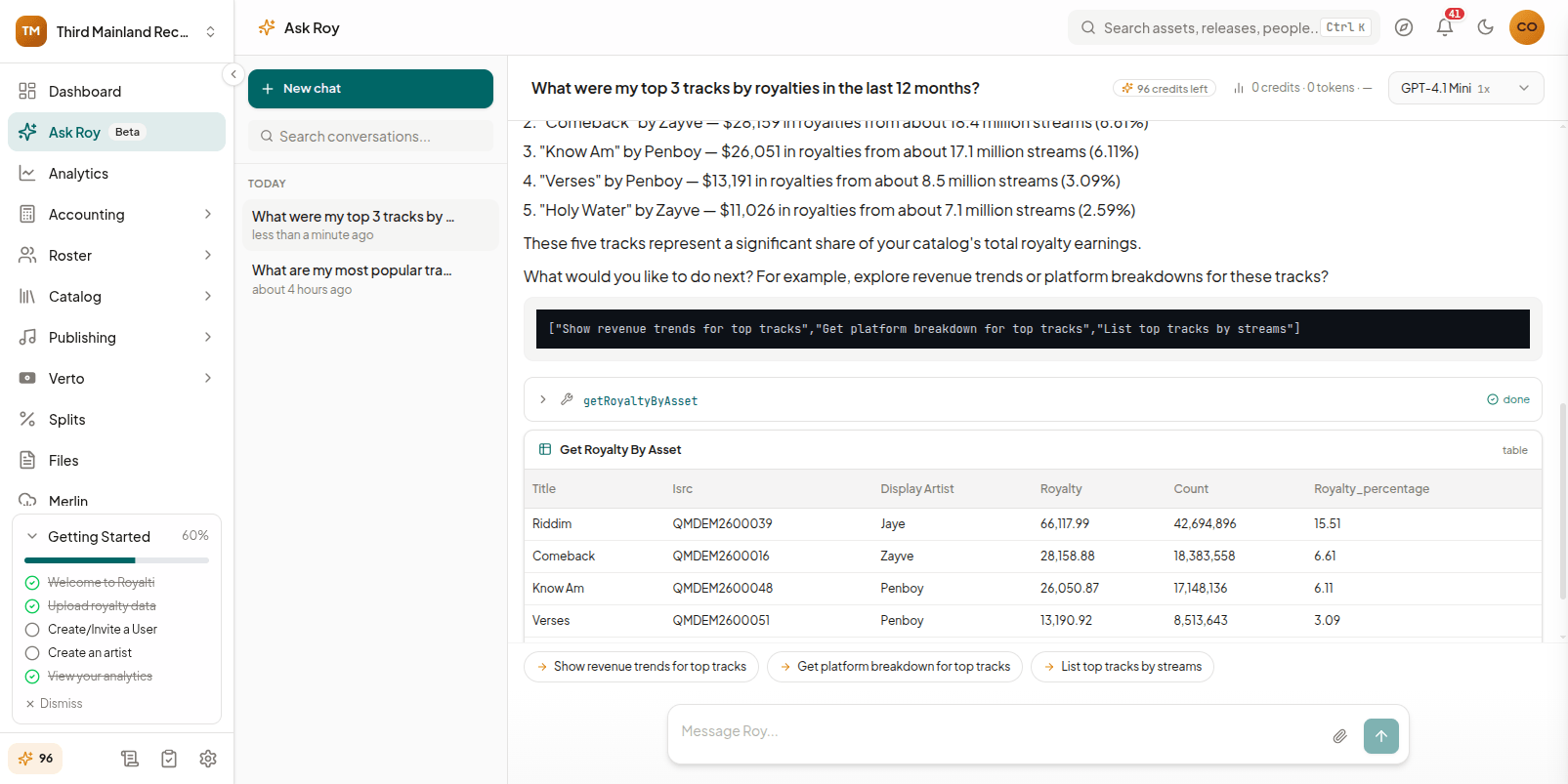
Roy is available in two places:
- Floating widget: a chat button available from most admin pages. Open it with the button or the
Cmd+.keyboard shortcut. - Full-page chat: go to Ask Roy in the main navigation for a larger, dedicated chat view with your conversation history down the side.
What Roy can see depends on your role. Admins get workspace-wide prompts, tools, and links into /a admin pages. Artists/members using the widget get a scoped set of prompts and tools limited to their own royalties, catalog, and payouts, with no admin-only data or links.
What You Can Ask Roy
Roy answers questions using your actual account data, not generic help text. Typical questions include:
- "Show Zayve's Q3 royalty summary"
- "Why did the FUGA upload fail?"
- "Find missing splits for the Afterhours EP"
- "What's due to Kayode Bello this month?"
- "Check The Orchard delivery status"
Artists and members can ask member-scoped versions, such as "How are my royalties this month?" "Which track is performing best?", or "When's my next payout?"
Roy's answers can include visual results: tables, charts, and checklists alongside their written response, so a question like "compare last two months of streaming revenue" can come back as a chart rather than a wall of text.
The launchpad
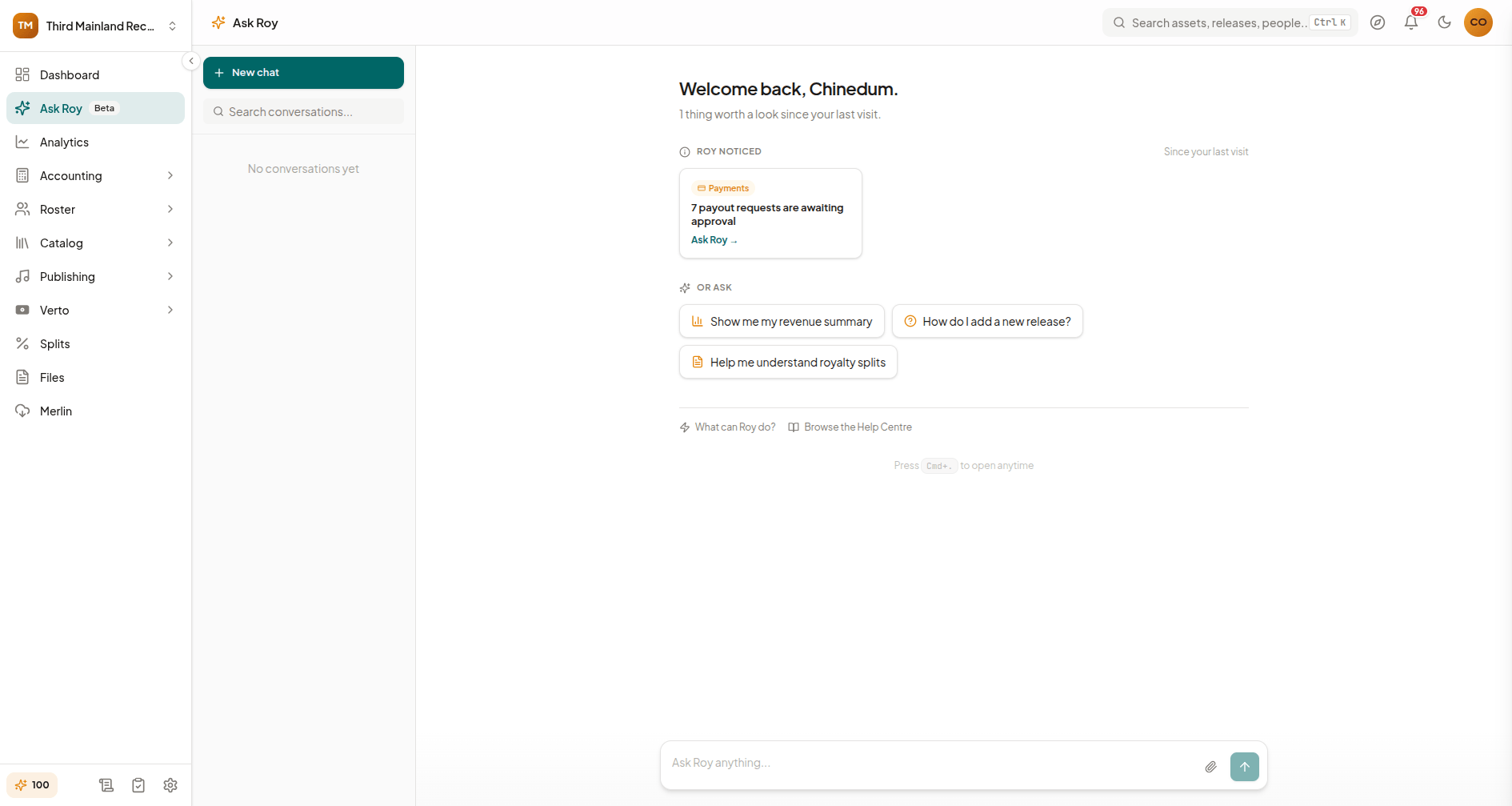
When you open Roy with no active conversation, you land on a launchpad with a few sections:
- Suggested prompts: a row of ready-to-click prompts tailored to your role and the page you're on.
- What Roy can do: capability cards (Royalties, Catalog, Payments, Releases, Files, Help) you can click to start a relevant prompt.
- From the Help Centre: related help articles, with an option to ask Roy to summarize one.
If you have a paused guided workflow or recent activity Roy noticed (like a failed upload or missing splits), returning to the launchpad shows a "Pick up where you left off" card and "Roy noticed" notices instead, so you don't lose track of in-progress work.
Guided Workflows: "Build with Roy"
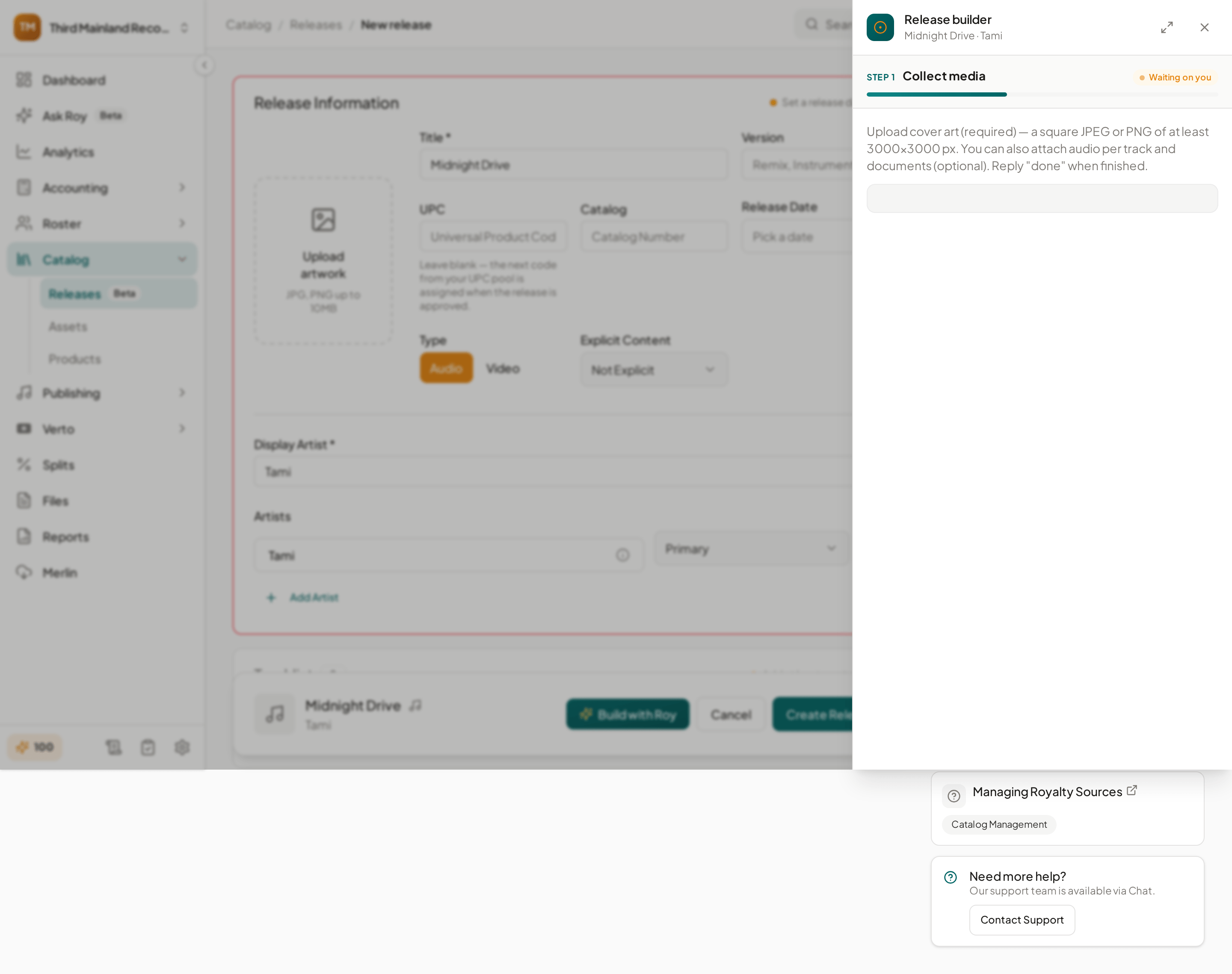
Some tasks in Royalti go beyond a single Q&A. Roy can run a guided, multi-step workflow to help you complete them. The clearest example is release building: from the release creation screen, a Build with Roy button launches a deterministic, step-by-step build flow (metadata, tracks, artwork, submission) rather than opening a free-form chat.
- Workflows can be paused and resumed: if you leave partway through, the launchpad's "Pick up where you left off" card lets you continue.
- Guided workflows are a distinct feature from ad-hoc chat: they walk you through a fixed sequence of steps rather than answering an open-ended question.
Roy's Knowledge Base
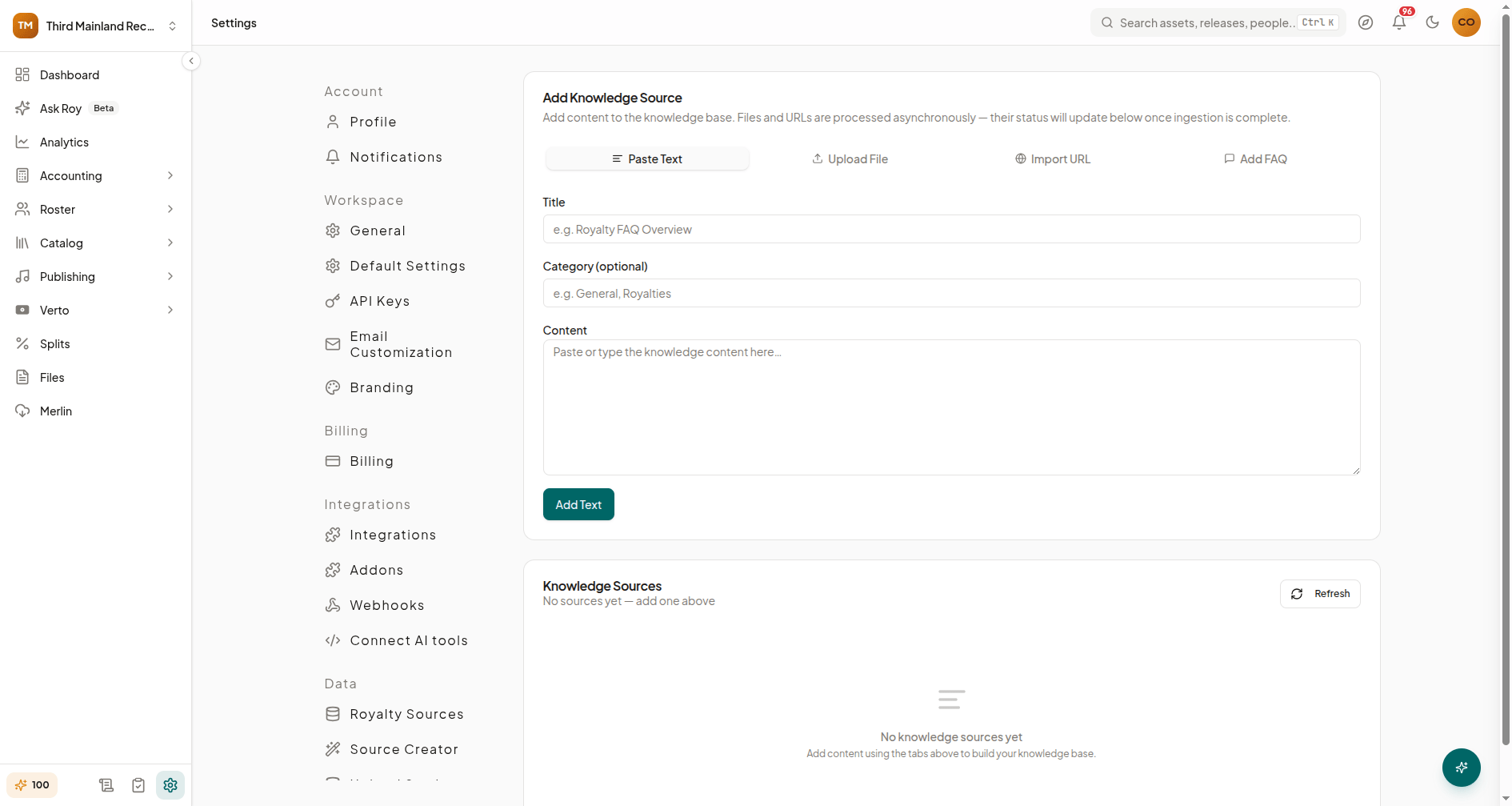
Admins can add custom content that Roy uses to answer questions specific to your workspace, internal policies, FAQs, or reference documents that live outside your catalog/royalty data.
To manage it, go to Settings → AI → Knowledge Base. From there, you can:
- Add a source using one of the available methods: paste text directly, upload a file (PDF, DOCX, Markdown, TXT, or CSV, up to 10 MB), import from a URL, or add FAQ entries.
- Track status: new sources are processed asynchronously; the sources list shows each source's status and updates automatically while anything is still pending or processing.
- Edit or re-ingest a source's title/category, or trigger re-processing if the source content changed.
- Delete sources you no longer want Roy to reference.
Access, Credits, and the Model Selector
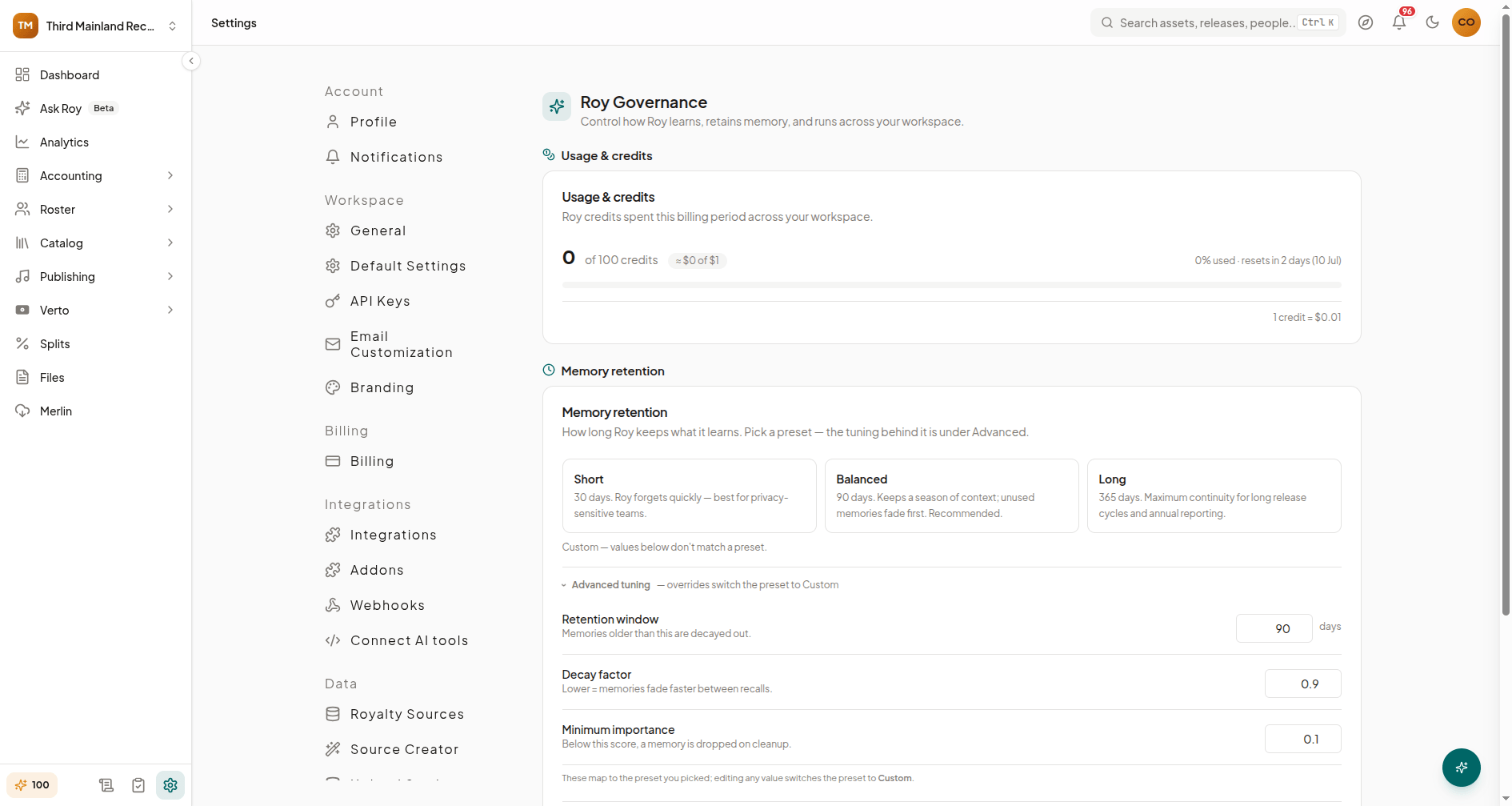
Roy's usage is metered by AI credits, and admins control who can use it.
- Roy Access (Settings → AI → Roy Access): sets the access policy for your workspace: everyone, admins only, or a specific allowlist of members, plus optional per-user limits. This page also shows a per-member usage table so admins can see who's using Roy and how much.
- Governance (Settings → AI → Governance, admin/owner only): a fuller admin panel covering usage & credits (credits-first, with an approximate USD equivalent), memory retention settings (how long Roy remembers past conversation context, with Short/Balanced/Long presets), and Roy's live status (active model, connection, tools available).
- Credits pill: inside the chat itself, a small "credits left" pill shows your workspace's remaining balance for the billing period; hovering over it shows the full used/total breakdown.
- Model selector: a dropdown in the chat header lets you choose which AI model answers your questions. Each option shows a relative cost multiplier, since larger models use more credits per message.
If your workspace runs out of credits for the period, Roy shows a "workspace credits exhausted" state; your conversation is saved and reopens automatically once credits reset. If your plan doesn't include Roy at all, the Roy Access page shows an upgrade prompt instead of the usual settings.
Role-Aware Coping, in Short
- Admins/owners: full workspace prompts and tools, admin-only capability cards (like Payments), links into
/aadmin pages, resume cards for in-progress workflows, and access to Roy Access/Governance/Knowledge Base settings. - Artists/members: a scoped widget limited to their own royalties, catalog, and payouts, with no admin links or entity references in notices.
What's Next
- Settings → AI → Knowledge Base: add custom content Roy can draw on
- Settings → AI → Roy Access: control who can use Roy and set per-user limits
- Settings → AI → Governance: manage credits, memory retention, and Roy's status
Have a question Roy can't answer yet? Open the chat and ask. If it's something the knowledge base should cover, an admin can add it from the Knowledge Base settings page.
Related articles
How to Use Ask Roy: Royalti's AI Assistant
Ask Roy is Royalti's built-in AI assistant for querying royalty data, catalog, splits, and business metrics in plain English.
Ask Roy Capabilities: Queries, Actions, Files & Workflows
Everything Roy can do — data queries, workspace management, catalog audits, enrichment, file analysis, and guided workflows.
25 Example Questions to Ask Roy About Your Royalty Data
Real example queries for revenue, catalog, splits, audits, enrichment, and uploads — organized by category.
Still stuck?
Support answers within one business day — usually much faster.