Messy Royalty Data Meets Claude Code: What the Royalti MCP and API Skill Made Possible
We prepped catalog and royalty data for Measure of Music. The session exposed every messy-data problem labels quietly live with — UPCs rendered as scientific notation, sub-cent payouts rounded to zero, date formats that don't agree. Here's what we fixed.

Every February, Measure of Music runs a weekend hackathon where music researchers, analysts, and data-curious folks do real work on real industry data. This year, Royalti committed to providing catalog and royalty data for the teams.
Before we could hand anything off, I had to get my own workspace in order. Six DSP sources of backlogged royalty reports. A nearly-empty catalog that didn't match the data sitting in the files. UPCs rendered as 8.85E+11 because somewhere, at some point, someone opened a CSV in Excel and saved it. The usual quiet chaos that accumulates when you're the one running the platform and trying to dogfood it.
I ran the whole operation through Claude Code in one afternoon.
What happened in that session became a compressed tour of every messy-data problem labels and distributors quietly live with. Some of it became fixes we shipped in the weeks after. All of it changed how I think about what a royalty import tool should actually do.
This post is a walkthrough of what actually happened. No demo environment. No curated examples. Just a real afternoon of music data operations, and what I learned to put back into the product.
The Starting Point
Here's what my Royalti workspace looked like at the start of the session:
- 99 assets in the catalog (none with ISRCs)
- 361 products (none with UPCs)
- Zero royalty data from TikTok, CapCut, Snapchat, or Facebook
- A backlog of Spotify and other DSP statements sitting in folders, unprocessed
Months of royalty reports from our distributor Merlin had been piling up. Each source — Spotify, TikTok, CapCut, Snapchat, Facebook — had its own file format, its own accounting periods, and its own quirks.
Hackathon participants were going to look at this. That mattered. Internal mess you can rationalize. External mess you cannot.
Uploading the files manually through the web interface would have meant clicking through the same four-step flow over a hundred times: get upload URL, upload to cloud storage, confirm upload, confirm detection with the correct source and period metadata.
I didn't do any of that manually.
Phase 1: Bulk Uploading 125 Royalty Files
The first thing I asked Claude Code to do was upload royalty files for merlin_spotify — about 30 monthly statements spanning two years. Claude examined the files, identified the naming convention (each filename contained the sale period), mapped out the accounting and sale periods, and wrote a shell script to automate the four-step upload flow for every file.
Then we repeated this for five more sources: merlin_tiktok, capcut, tiktok, merlin_snap, and merlin_facebook. Each had different file structures. Some were CSVs, some were ZIPs containing CSVs. Some had the period in the filename, others embedded it in the directory structure. Facebook had separate accounting and sale periods that didn't match.
Claude handled all of it. For each source, it:
- Examined the files and directory structure
- Mapped each file to its correct accounting period and sale period
- Generated an upload script with the right API calls
- Ran the uploads with progress tracking
- Monitored the processing jobs until completion
125 files across 6 DSP sources, all uploaded and processed in one session.
Along the way, things went wrong — and that's where it got interesting.
Phase 2: Three Silent-Failure Bugs
During the uploads, some files kept failing. Claude didn't just report the errors — it traced them back to the source.
Three bugs, each a variation on the same theme: silent failure. Tab-separated files being parsed as comma-separated. Failed background jobs leaving their parent file stuck on "processing" forever. An analytics view refusing to update because a shared lookup table got misclassified as tenant data.
One-line fixes, each of them. What made the bugs findable wasn't complexity — it was the willingness to read the code instead of guessing.
This class of bug is quiet by nature. The status looks green. Your data isn't where it should be. If your tools surface these to you, you catch them. If they don't, they quietly warp your numbers.
Phase 3: Handling Duplicates and Edge Cases
With 125 files across overlapping time periods, duplicates were inevitable. Claude found that four months of TikTok data had been uploaded as both .csv and .csv.zip — creating double entries in BigQuery.
I told it to clean up: "delete all the duplicates and main ones, then reupload them once."
Claude identified the 9 affected files (including one that had failed due to a race condition), deleted them through the API, re-uploaded the 4 correct ZIPs with proper period metadata, and verified all processing jobs completed cleanly.
This kind of detective work — identifying duplicates across file formats, checking which versions are authoritative, cleaning up, and re-uploading — is exactly the type of task that eats hours when done manually. Claude did it in minutes.
Phase 4: Importing 7,600 Catalog Items
With all the royalty data processed, we had a new problem. The BigQuery tables contained roughly 5,000 unique ISRCs and 2,900 unique UPCs from the royalty reports, but the Royalti workspace only had 99 assets and 361 products — most without identifiers. The catalog was essentially empty compared to the data flowing through it.
If I handed this to hackathon teams as-is, they'd see royalty lines referencing tracks that didn't exist in the catalog. Useless.
I asked Claude to enrich and import the missing catalog items using external APIs.
The MCP-to-API Pivot
We started with the Royalti MCP server — a bridge that lets AI tools talk to your Royalti workspace directly — to query the existing catalog. But when it came time to call external APIs (Spotify, Deezer) and bulk-create thousands of records, Claude needed more control than MCP tools provided. It seamlessly pivoted to using the Royalti API Skill — our published API reference that teaches AI assistants the full endpoint catalog.
MCP is powerful for interactive queries and standard operations. When you're building a custom pipeline that chains multiple APIs together, direct API calls give you the flexibility to handle edge cases, retry logic, and batch operations. Claude used both in the same session, switching based on what the task required.
Building the Enrichment Pipeline
Claude built a Python script that:
- Extracted all unique ISRCs and UPCs from the royalty BigQuery data
- Queried Spotify's API for each track — using text search (title + artist) since ISRC-based search returned zero results for most tracks
- Queried Deezer's API for non-Nigerian ISRCs via ISRC lookup — our catalog is mostly NGA-prefixed, and Deezer handles those better than Spotify does
- Built creation payloads with enriched metadata: titles, artists, genres, explicit flags, duration, release dates
- Bulk-created records via the Royalti API with parallel requests
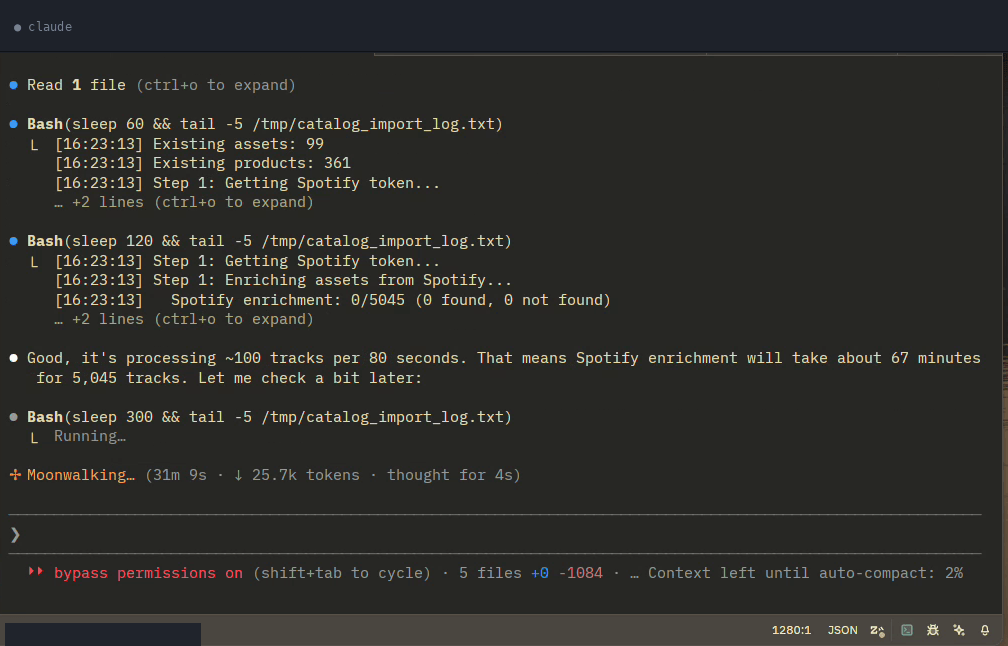
Spotify matched metadata for roughly 3,100 tracks out of 5,000. Deezer added another couple hundred. In total, around 3,300 tracks got enriched with real metadata before import.
When the First Try Didn't Work
This wasn't a clean, first-try success. Real engineering never is.
The pipeline hit three classes of failures: bot-detection blocking its requests, field-name mismatches between what Claude sent and what the API expected, and timeouts once the server was under load. Each time, Claude diagnosed the problem, adapted its approach, and re-ran the affected phase. The product-creation phase, the worst offender, finished at roughly 99% success after Claude dialed down the pace and retried.
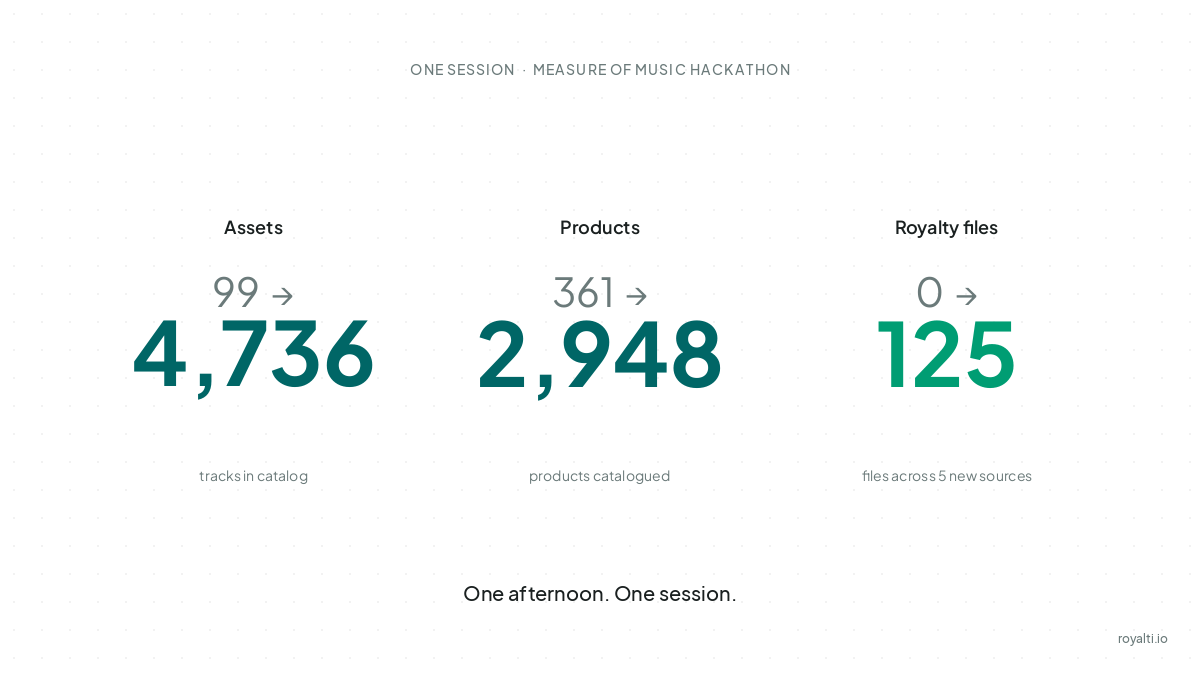
Final Numbers
· Before · After · Created
Assets · 99 · 4,736 · 4,631
Products · 361 · 2,948 · 2,577
Royalty files · 0 (for 5 sources) · 125 · 125
Roughly 32 failures out of ~7,300 API creation calls — most of them transient timeouts, a handful of UPC format issues.
The data was ready for the hackathon.
What the Hackathon Exposed
Handing the data off to external teams changed what I noticed. When you're the only person looking at your workspace, you develop a tolerance for its quirks. When strangers are about to query it, the quirks become defects.
Four patterns kept surfacing — not as bugs in the infrastructure, but as rough edges in how royalty data itself behaves in the wild:
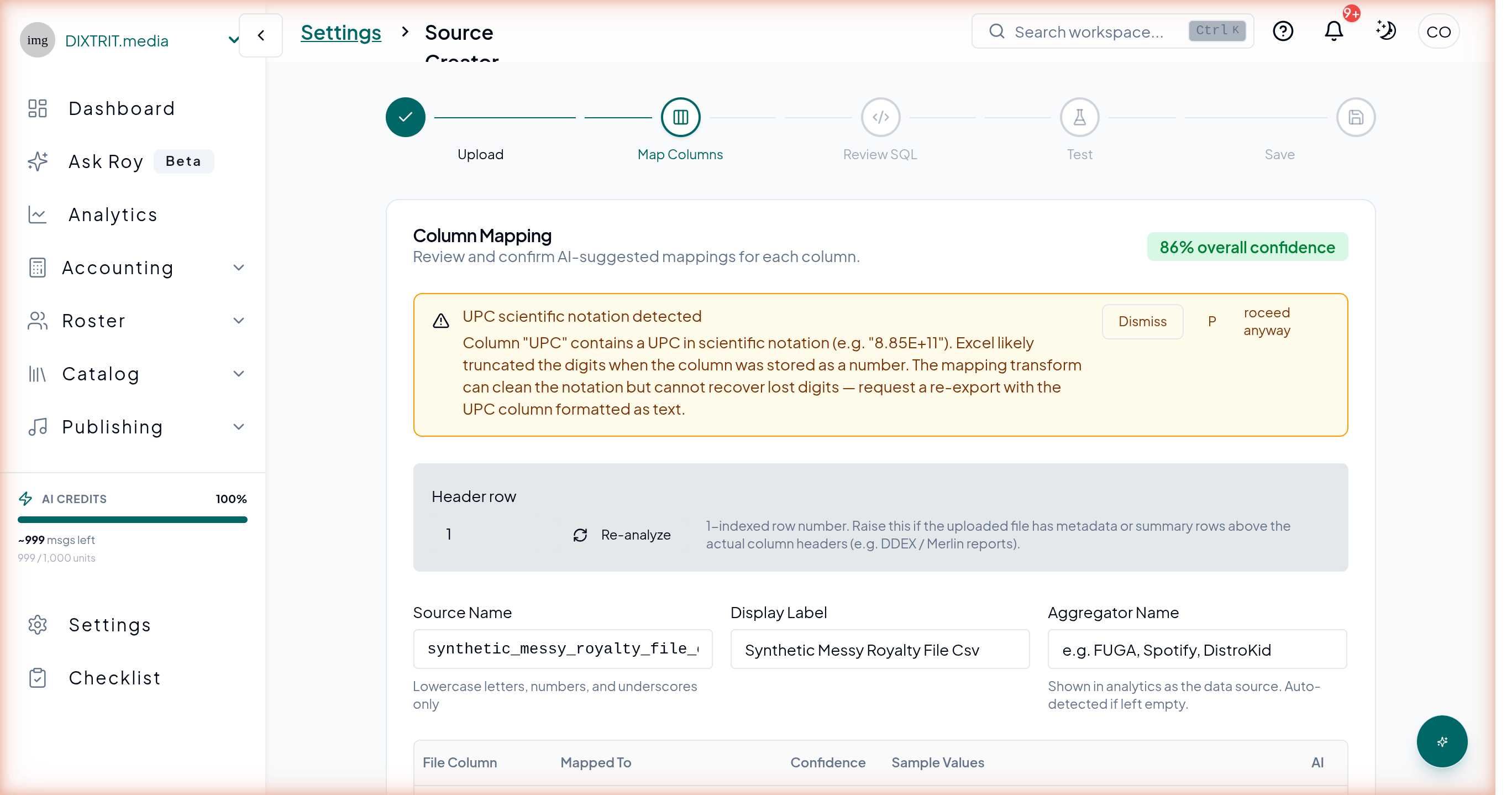
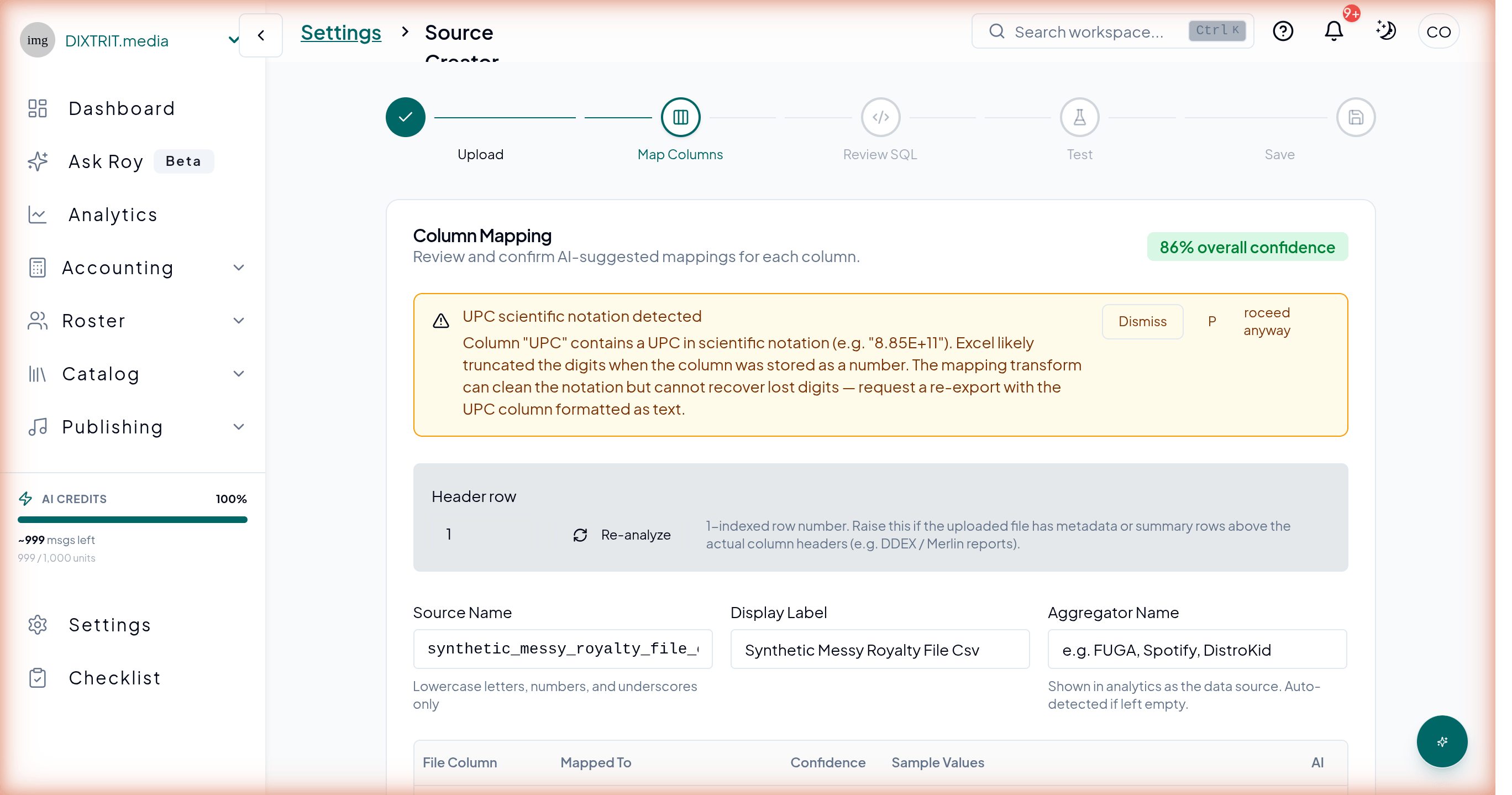
UPCs rendered as scientific notation. Open a royalty CSV in Excel. Save it. Your 12-digit UPCs are now 8.85E+11. Every label with non-technical staff touching their reports has this problem, and until this year nothing in our import flow flagged it for the user.
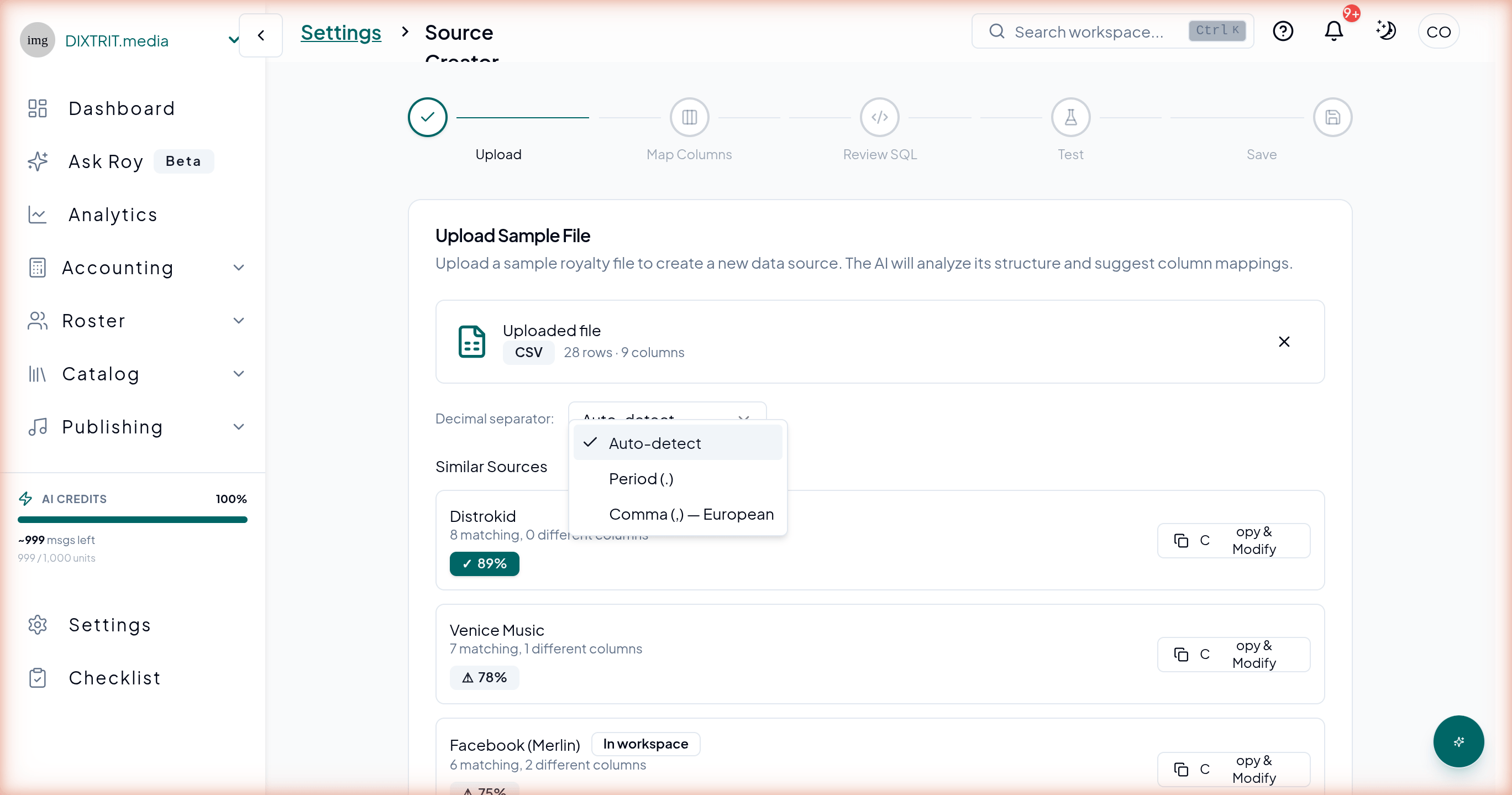
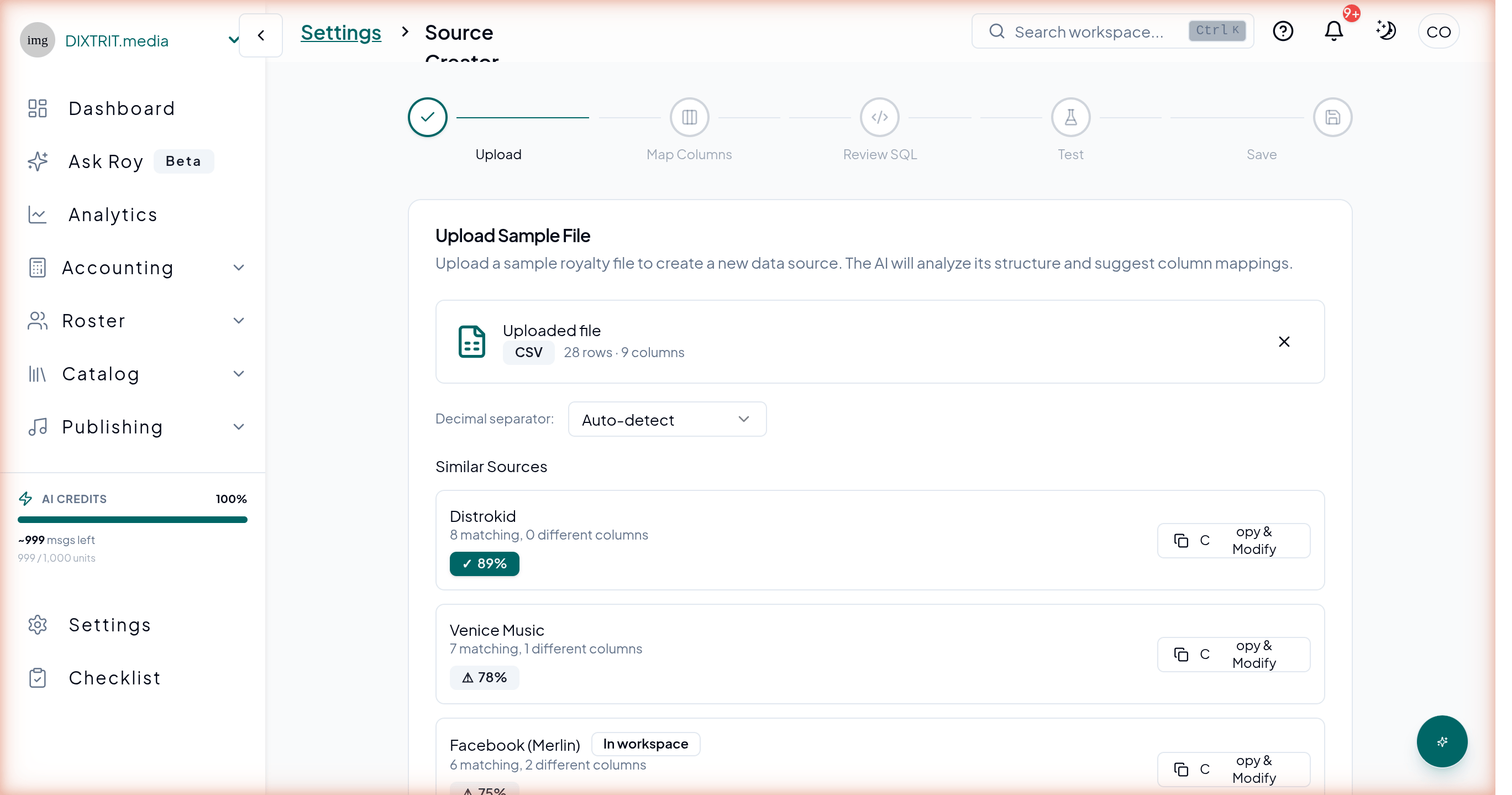
Decimal separators that don't agree. European distributors write 1.234,56 — period as thousands separator, comma as decimal. American ones write 1,234.56. Any tool that doesn't ask which convention the file uses is making a guess. We'd rather not guess.
Sub-cent amounts that round to zero. Per-stream payouts on Spotify are often $0.003. On YouTube Music they can be as low as $0.00069. Standard two-decimal display shows individual lines as $0.00 even when the totals add up correctly. It makes the data hard to trust at a glance — and hard to hand to an analyst who wasn't in the room when it loaded.
Dates in whichever format the distributor felt like. European distributors write DD/MM/YYYY. American ones write MM/DD/YYYY. A tool that assumes one will fail imports from the other — just a rejection, no helpful error.
None of these are hackathon-specific problems. They're what royalty data looks like every day for every label. Preparing the data for outside eyes just made them impossible to ignore.
Catching the Mess Before It Enters Your Catalog
The session in February turned into a short product roadmap. Four improvements to Source Creator — Royalti's guided flow for setting up a royalty source — all focused on one idea: notice the mess at ingest, name it clearly, and give the operator control.
1. Scientific-notation UPC warnings
Paste a file where Excel has converted your UPCs into 8.85E+11, and column mapping flags it on the spot — with a plain-English explanation of what likely happened and what to do about it. You can fix the source file and re-upload, or proceed knowing the IDs aren't what they should be, but you're not accepting bad data without seeing it first.
2. Decimal separator auto-detect with override
Source Creator samples your file, decides whether it's .-decimal or ,-decimal, and shows you what it picked before any rows get imported. You can override it in one click if the detection got it wrong. No more silent guessing between European and American conventions.
3. Adaptive precision on sub-cent amounts
Sample rows show royalty amounts at the precision the data actually has — $0.00069, $0.0012, $0.003 — not rounded to two decimals where everything looks like $0.00. It makes the math obvious to an analyst who wasn't in the room when the file was loaded.
4. Date format auto-detect
Source Creator reads a sample of date values, identifies the format (DD/MM/YYYY or MM/DD/YYYY), and surfaces what it detected with the confidence level. European and American date conventions both work without failed imports.
None of these are glamorous features. They're the kind of work that gets deprioritized forever unless something forces you to look at your data the way a stranger would.
What Made the Session Work
Persistent Context
Claude Code maintains context across the entire session. When a file upload failed at 6 PM because of a bug I'd fixed at 3 PM, Claude remembered the fix and knew not to re-investigate. When product creation failed, it knew the asset phase had already succeeded and only retried what was needed. This continuity is what makes it an operator, not just an assistant.
Tool Switching
In a single session, Claude used:
- Shell scripts for batch file uploads with progress tracking
- The Royalti MCP server for workspace queries and checklist operations
- The Royalti API Skill for endpoint knowledge when building direct integrations
- The Spotify and Deezer APIs for metadata enrichment
- Python for the enrichment and import pipeline
- Direct source code reading for debugging production bugs
It chose the right tool for each task without being told which to use.
Error Recovery
Every non-trivial operation hit problems. Bot detection. Field validation mismatches. API timeouts under load. Duplicate files. Race conditions. In each case, Claude diagnosed the issue, adapted its approach, and moved forward. This is the difference between a tool that works in demos and one that works in production.
Time Perspective
Here's a rough estimate of what this session covered, if done manually:
Task · Manual Estimate · Claude Code
Upload 125 royalty files (6 sources) · 6-8 hours · ~2 hours (automated)
Investigate 3 silent-failure issues · 4-8 hours · ~1 hour
Identify and clean up duplicate files · 1-2 hours · ~15 minutes
Enrich ~5,000 ISRCs from Spotify/Deezer · Not feasible manually · ~2 hours (automated)
Import 7,200+ catalog items · 2-3 days (manual entry) · ~3 hours (automated)
Total · 3-5 days · One afternoon
The enrichment step is the interesting one. You wouldn't realistically look up 5,000 tracks on Spotify manually. You'd either skip it (leaving your catalog without metadata) or build a script yourself — which is what Claude did, but in minutes instead of hours.
What This Means for Music Operations
I run Royalti. I built the platform. And I still used AI to operate it — because the operational work of running a music data business is repetitive, detail-heavy, and exactly the kind of work that benefits from automation with judgment.
If you're running a label, a distributor, or any music business that touches royalty data:
The bottleneck isn't your platform. It's the operational overhead of getting data in, keeping it clean, and connecting the pieces. Claude Code doesn't replace your royalty platform — it operates it at a pace that humans can't match for batch work, and it keeps trying when a first pass fails.
Your data is messy. That's not a flaw — it's the default. Scientific-notation UPCs, sub-cent rounding, decimal-comma chaos, four date formats. Every label has these. The question is whether your tools surface them or pretend they aren't there.
AI tools that can talk to your platform directly are the enabler. The Royalti MCP Server and API Skill gave Claude the knowledge to interact with our platform without me explaining every endpoint. If your tools have APIs, this pattern works for any platform.
Try It
If you run a label, distributor, or rights-holder operation and this kind of work is on your plate:
- [Upload a real royalty file into Royalti](https://app.royalti.io) — start a workspace and see how Source Creator handles the patterns above with your own data.
- [Set up the Royalti MCP Server](/help/setting-up-the-royalti-mcp-server) — connect your AI assistant to your workspace for interactive queries.
- [Install the API Skill](https://github.com/Royalti-io/royalti-api-skill) — for the pipelines Claude built in this session, give your coding assistant full API knowledge.
The screenshots above are from the production Royalti workspace, taken against the same kind of messy file the session was built around.
Sources
- Measure of Music — Annual music industry data hackathon and research community
- Claude Code — Anthropic's agentic coding tool
- Model Context Protocol — Open standard for AI-to-tool connections
- Royalti MCP Server Setup — Connect AI to your workspace
- Royalti API Skill — Installable API knowledge for AI assistants
- Royalti API Reference — Full endpoint documentation
About the author
Comments
No comments yet. Be the first to comment!